

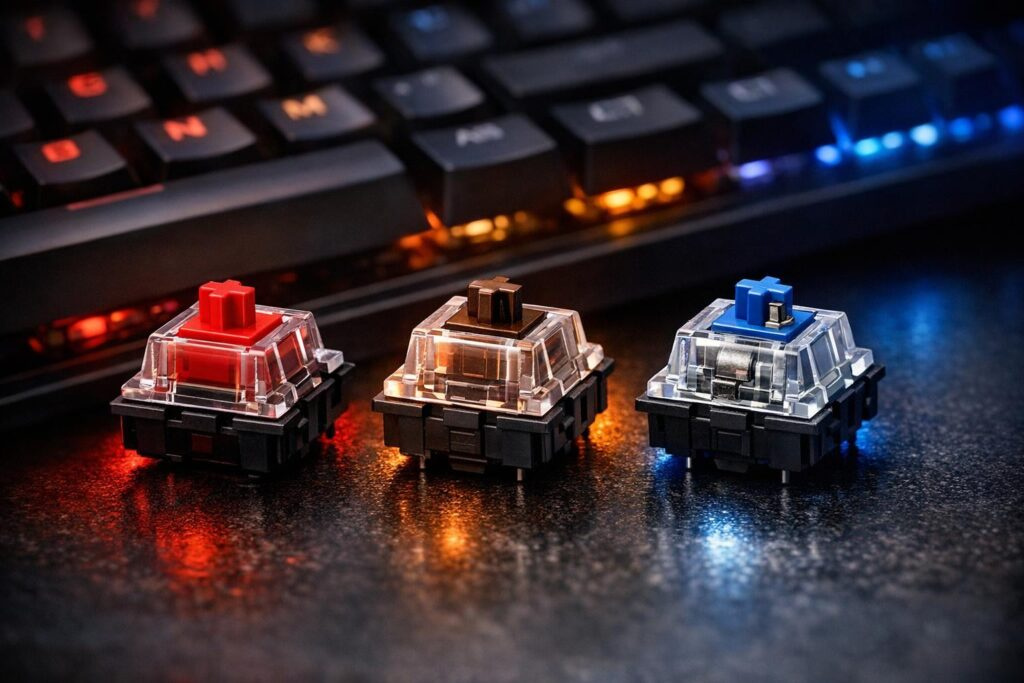

So you’re deep into an intense Valorant match or hammering out work documents late at night, and suddenly you realize: your keyboard either feels like a dream or an absolute nightmare. The secret behind that experience? Keyboard switch types. Whether you’re rolling with linear switches, tactile switches, or clicky switches, these little mechanical marvels determine everything from how your keystrokes sound to how fast you can react in-game. This guide breaks down keyboard switch types explained in plain English, helping you find the perfect match for gaming, typing, or both. Ready to discover which switch will level up your setup? Let’s dive in!
Why Mechanical Switches Actually Matter for Your Gaming Experience
Mechanical keyboard switches are what separate a premium keyboard from those mushy rubber dome boards gathering dust in your closet. Unlike membrane keyboards that feel like typing on a wet sponge, mechanical switches deliver precise feedback, insane durability (we’re talking 50-100 million keystrokes), and total customization. You’ll encounter three main families: MX-style switches with their iconic cross-shaped stem, optical switches that use light beams for lightning-fast response, and hall-effect switches with adjustable actuation points.
But here’s what really matters: the feel. Linear switches glide smooth as butter with zero bumps. Tactile switches give you a satisfying bump right when the key registers. Clicky switches add an audible click that sounds like a typewriter from the golden age. Each type creates a completely different typing and gaming experience, so choosing the right one isn’t just preference—it’s performance.
Linear Switches: The Speed Demon’s Choice for Competitive Gaming
When you press a linear switch, it travels straight down with consistent resistance—no bumps, no interruptions, just pure smoothness from top to bottom. Most linear switches require around 45-60 grams of force, making them light enough for rapid-fire inputs but heavy enough to prevent accidental presses during heated gaming sessions.
Why Gamers Love Linear Switches
- Lightning-fast response: No tactile bump means nothing slows down your keystrokes, perfect for games like Counter-Strike, Apex Legends, or any fast-paced shooter where milliseconds matter
- Quiet operation: Especially with silent variants, linear switches won’t wake your entire household during late-night gaming marathons
- Smooth keystroke: After proper lubrication, quality linear switches deliver that coveted “creamy” feel with a deep, satisfying sound
- Double-tapping efficiency: The smooth action makes it easier to quickly tap keys multiple times, essential for abilities in MOBAs or rapid movement in FPS games
The Downsides to Consider
Linear switches aren’t perfect for everyone. Without tactile feedback, you might accidentally trigger keys when resting your fingers. Some users find them boring for typing since there’s no satisfying bump to confirm your keystroke. Stock linear switches can also feel scratchy or inconsistent, though lubing them transforms the experience into something special—that’s when you get those buttery smooth thocky switches everyone raves about.
Popular Linear Switch Options
- Cherry MX Red: The classic linear switch, light at 45g actuation force
- Gateron Yellow: Budget-friendly and smoother than many premium options
- Gateron Milky Yellow: Deeper sound profile with factory lubrication
- Cherry MX Speed Silver: Shorter actuation distance for even faster responses
Looking for the best linear switches for gaming? Start with these proven performers, and you’ll understand why competitive players swear by them.
Tactile Switches: The Perfect Balance for Typing and Gaming
Tactile switches add a noticeable bump somewhere in the middle of the keystroke—usually right at the actuation point around 2mm down. This bump provides physical confirmation that your keypress registered without requiring you to bottom out the key. Think of it as a little speed bump that says “yep, I got that” before you finish the keystroke.
What Makes Tactile Switches Special
The tactile bump creates a middle ground between the smoothness of linears and the loudness of clickies. You get feedback without the noise, making them office-friendly while still being satisfying for extended typing sessions. Most tactile switches require slightly more force than linears—typically 50-70 grams—which helps prevent accidental keypresses during intense gaming moments.
Advantages of Going Tactile
- Excellent typing feedback: That bump helps reduce typos since you physically feel when each key activates
- Versatile performance: Work great for both gaming and productivity tasks without compromise
- Moderate noise levels: Quieter than clicky switches but more satisfying than linears
- Precision for strategy games: The feedback helps with deliberate keypresses in games like StarCraft, Civilization, or MMOs with complex ability rotations
Potential Drawbacks
The tactile bump does create slightly more resistance than linear switches, which some competitive FPS players claim slows them down during rapid inputs. However, for 99% of gamers, this difference is completely unnoticeable. The bigger consideration is finding tactile switches with the right bump strength—some are barely perceptible while others feel quite pronounced.
Top Tactile Switch Recommendations
- Cherry MX Brown: The standard tactile switch, subtle bump at 55g
- Glorious Panda: Pronounced tactile bump for maximum feedback
- Boba U4T: Strong tactility with great sound profile
- Durock T1: Smooth tactile experience at a reasonable price
If you want one keyboard that handles everything from spreadsheets to Starcraft without switching boards, tactile switches are your answer.
Clicky Switches: Maximum Feedback for the Bold
Clicky switches take the tactile bump concept and crank it up to eleven by adding an audible click sound. Thanks to a special click mechanism inside (usually a click bar or click jacket), these switches produce that distinctive typewriter sound that people either absolutely love or can’t stand. There’s no middle ground with clickies—they make their presence known.
The Clicky Switch Experience
Every keystroke on a clicky switch provides both physical and auditory confirmation. You feel the bump and hear the click right at the actuation point, creating the most feedback of any switch type. It’s like your keyboard is cheering you on with every input, which some users find incredibly satisfying and motivating during long gaming or typing sessions.
“Clicky switches aren’t just a keyboard choice—they’re a lifestyle statement. If you love that vintage typewriter vibe and don’t mind letting everyone know you’re working, nothing beats that satisfying click.”
When Clicky Switches Shine
- Maximum sensory feedback: Perfect for users who want absolute certainty with every keypress
- Immersive single-player gaming: The sound adds atmosphere to RPGs, survival games, and story-driven experiences
- Typing satisfaction: Many writers and programmers love the rhythmic clicking during long sessions
- Nostalgic appeal: Brings back memories of classic mechanical keyboards from computing’s golden age
The Noise Factor
Let’s address the elephant in the room: clicky switches are loud. If you share a space with others, stream with a microphone nearby, or work in an office, these switches will definitely draw attention. They’re the loudest of all mechanical switch types, producing that sharp “clack” sound that carries through walls. Lubrication doesn’t help much since the click mechanism itself creates the sound, not friction between components.
Notable Clicky Switch Options
- Cherry MX Blue: The iconic clicky switch that started it all
- Kailh Box White: Sharper, crisper click than MX Blues
- Kailh Box Jade: Heavier and louder for maximum click satisfaction
- Outemu Blue: Budget-friendly alternative to Cherry switches
Comparing Linear vs Tactile vs Clicky: The Complete Breakdown
| Feature | Linear Switches | Tactile Switches | Clicky Switches |
|---|---|---|---|
| Keystroke Feel | Smooth, no bump | Noticeable bump mid-press | Bump plus audible click |
| Actuation Force | 45-60g typical | 50-70g typical | 50-70g typical |
| Noise Level | Quiet to moderate | Moderate | Loud |
| Best for Gaming | Competitive FPS/fast-paced | Strategy/MMO/versatile | Immersive single-player |
| Best for Typing | Fast but less feedback | Excellent balance | Maximum satisfaction |
| Office Friendly | Yes (especially silent) | Yes | Absolutely not |
| Sound Profile | Thocky or muted | Moderate thock | Sharp clack |
How to Choose the Best Keyboard Switches for Your Needs
Picking the right switch type doesn’t require a PhD in mechanical engineering—just honest answers about how you’ll actually use your keyboard. Here’s a practical framework for making the decision:
Consider Your Primary Use Case
Competitive gaming focus: Linear switches give you that edge in reaction time, especially for games where every millisecond counts. The smooth keystroke means nothing interferes with your inputs during clutch moments.
Heavy typing workload: Tactile switches reduce typing fatigue and errors during long documents, code sessions, or content creation. The feedback helps you maintain rhythm without constantly bottoming out keys.
Mixed usage: Tactile switches again—they’re the Swiss Army knife of mechanical switches, handling both gaming and productivity without feeling like a compromise.
Pure typing enjoyment: Clicky switches if you’re alone and love that typewriter experience, or premium tactiles if you need something quieter but still satisfying.
Factor In Your Environment
- Shared space: Stick with linear or silent switches to avoid annoying roommates, family, or coworkers
- Streaming or recording: Silent linear switches won’t bleed into your microphone
- Solo setup: Go wild with whatever switch type feels best—clickies included
- Office environment: Definitely avoid clickies unless you want enemies
Test Before Committing
The single best investment you can make is a switch tester—a small board with 6-12 different switch types you can try. Spending ten bucks on a tester beats buying a full keyboard only to discover you hate how it feels. Many enthusiast brands also offer hot-swappable keyboards where you can change switches without soldering, letting you experiment until you find your perfect match.
Don’t Forget About Switch Weight
Beyond the switch type, actuation force matters significantly. Lighter switches (45g) feel effortless but may lead to accidental presses. Heavier switches (70g+) provide more control but can cause finger fatigue during extended sessions. Most people find 50-60g hits the sweet spot, but your preference might differ based on finger strength and typing style.
Understanding Switch Sound Profiles: Thocky, Clacky, and Creamy
The mechanical keyboard community has developed specific terminology for describing switch sounds, and understanding these terms helps you find exactly what you’re looking for:
Thocky switches produce a deep, bass-heavy sound when bottoming out—think a satisfying “thunk” rather than a high-pitched click. This sound typically comes from linear switches in well-built keyboards with proper dampening. It’s the current gold standard for sound preference in the enthusiast community.
Clacky switches create a sharper, higher-pitched sound with more treble. Clicky switches naturally fall into this category, but some linear and tactile switches can also sound clacky depending on the keyboard case material and keycap material.
Creamy switches describe the feeling more than the sound—an ultra-smooth keystroke that feels like gliding through butter. Properly lubricated linear switches achieve this texture, eliminating any scratchiness or friction during the stroke.
Advanced Switch Technologies Worth Knowing About
Optical Switches
Instead of metal contacts, optical switches use a light beam that gets interrupted when you press a key. This eliminates contact bounce and theoretically provides faster actuation. Gaming brands love marketing these for competitive play, though the real-world difference versus quality mechanical switches is negligible for most players. The main advantage is longevity since there’s no metal contact to wear out.
Hall Effect Switches
These magnetic switches detect key position using the hall effect (measuring changes in magnetic fields). The killer feature? Adjustable actuation points. You can set exactly how far down a key needs to travel before it registers, customizing different keys for different purposes. Some hall effect keyboards even support analog input, where the distance you press affects in-game actions—revolutionary for racing or flight games.
Low Profile Switches
Standard mechanical switches have significant travel distance (around 4mm total). Low profile switches cut this roughly in half, creating a thinner keyboard with shorter travel. They still provide mechanical feedback but require less finger movement. Great for portable setups or users transitioning from laptop keyboards, though enthusiasts often prefer the full travel of standard switches.
Popular Switch Brands and Color Coding
Cherry MX established the color-coding system everyone else copied. Red for linear, brown for tactile, blue for clicky—this basic scheme appears across most brands. Cherry switches are reliable but often considered slightly scratchy compared to newer competitors.
Gateron makes Cherry clones that many users find smoother at a lower price point. Their switches use the same color system, making it easy to switch brands.
Kailh offers both Cherry-style and Box switches. Box switches feature a different design that’s more resistant to dust and liquid damage while providing a unique feel.
Zealios, Holy Pandas, and other boutique switches cater to enthusiasts willing to pay premium prices for specialized experiences—usually ultra-smooth linears or highly tactile switches.
Modifying Your Switches for Better Performance
Stock switches work fine, but the mechanical keyboard community has developed several modifications that dramatically improve feel and sound:
Lubrication: Applying thin lubricant to switch components eliminates friction and scratchiness, creating that coveted creamy feeling. It’s time-consuming (you need to lube each switch individually) but transforms mediocre switches into premium ones.
Films: Thin plastic films inserted between switch housing parts reduce wobble and create tighter tolerances. This improves consistency and often deepens the sound profile.
Spring swaps: Replacing the stock spring changes actuation force and can eliminate spring ping (a metallic ringing sound some switches produce).
Switch films plus lube is the ultimate combo for taking budget switches and making them perform like premium options.
Making Your Final Decision
At the end of the day, the best keyboard switches are the ones that feel right under your fingers during actual use. All the specifications and reviews in the world can’t substitute for personal experience. Start with the basics: linear for pure gaming speed, tactile for versatility, clicky for maximum feedback. Buy a switch tester or a hot-swappable keyboard to experiment. Pay attention to how your hands feel after an hour of use—that’s when the real differences become apparent.
The mechanical keyboard hobby goes deep, with endless options for customization and personal preference. But you don’t need to become an expert overnight. Pick a well-regarded switch that matches your primary use case, and you’ll immediately notice the improvement over generic keyboards. As you gain experience, you’ll develop stronger preferences and can always upgrade or modify your setup later.
Whether you end up with buttery smooth linears, satisfying tactiles, or bold clicky switches, welcome to a world where typing and gaming actually feel premium. Your fingers will thank you.
Frequently Asked Questions
Are linear or tactile switches better for gaming?
Linear switches are generally preferred for competitive gaming because they offer the fastest, smoothest keystroke without any tactile bump slowing you down. However, tactile switches work perfectly fine for gaming—the difference is minimal unless you’re a professional esports player. Choose linear for pure speed in fast-paced shooters, or tactile if you also do a lot of typing and want more versatile switches.
Why do some people prefer clicky switches despite the noise?
Clicky switches provide maximum sensory feedback—both physical and auditory—which many users find extremely satisfying. The sound confirms every keystroke, creating a rhythmic typing experience that some people genuinely enjoy. Writers, programmers, and gamers who play alone often love the nostalgic typewriter feel. The noise is only a problem in shared spaces, but in a private setup, many users consider it a feature rather than a bug.
What does it mean when people describe switches as “thocky”?
Thocky describes a deep, bass-heavy sound when keys bottom out—like a satisfying “thunk” instead of a high-pitched click. This sound typically comes from well-lubricated linear switches in keyboards with good construction, proper dampening materials, and quality keycaps. The thocky sound has become highly desirable in the mechanical keyboard community, representing a premium, satisfying typing experience.
Do I need to lubricate my mechanical switches?
Lubrication isn’t necessary, but it significantly improves the feel and sound of most switches. Stock switches often have a scratchy feel or inconsistent performance that lube eliminates. The process is time-consuming since you need to disassemble and lube each switch individually, but it transforms budget switches into smooth, premium-feeling ones. If you’re happy with how your switches feel out of the box, there’s no requirement to lube them.
Can I change switches without buying a new keyboard?
If you have a hot-swappable keyboard, yes—you can pop out switches and install new ones without any soldering or technical skills. This lets you experiment with different switch types easily. Traditional mechanical keyboards have switches soldered to the circuit board, which requires desoldering and resoldering skills to replace. When shopping for your next keyboard, look for hot-swap capability if you want the flexibility to change switches later.
What’s the difference between Cherry MX switches and other brands?
Cherry MX created the original mechanical switch design that most other brands copied. They’re reliable and consistent, but many users find newer brands like Gateron or Kailh smoother at lower prices. The main advantage of Cherry switches is universal compatibility and decades of proven reliability. However, you’re not missing out by choosing quality alternatives—modern switch manufacturers have often improved on Cherry’s original designs while maintaining the same mounting style and dimensions.

Comments (0)
Sign In / Sign Up
Sign in to leave a comment.
No comments yet
Be the first one to share your thoughts!