

 fatheryarik
Long gaming sessions are part of the lifestyle for millions of players worldwide. Whether you’re grinding ranked matches in competitive shooters or clearing endgame content in MMORPGs, hours can fly by without you noticing. But here’s the catch: poor gaming posture can turn your passion into a painful experience. Neck stiffness, lower back pain, wrist strain, and shoulder discomfort are common complaints among gamers who haven’t optimized their setup.
The good news? Achieving the best posture for long gaming sessions doesn’t require expensive equipment or complicated adjustments. With some simple ergonomic tweaks and awareness of how you sit, you can game comfortably for hours while protecting your body from long-term damage. This guide breaks down practical gaming posture tips that actually work.
Why Gaming Posture Matters for Your Health
Sitting in the same position for extended periods puts stress on your spine, muscles, and joints. When you slouch or lean forward during intense gameplay, you’re increasing pressure on your lower back and neck. Over time, this can lead to chronic pain, repetitive strain injuries, and reduced performance. Poor ergonomics for gamers isn’t just about discomfort—it can actually affect your reaction time, focus, and overall gaming performance.
Your body wasn’t designed to stay static for eight-hour sessions. Without proper support and positioning, muscles fatigue, blood circulation decreases, and your nervous system starts sending pain signals. The solution lies in creating a gaming setup that supports your natural body alignment while allowing you to stay focused on the screen.
The 90-90-90 Rule: Foundation of Gaming Posture
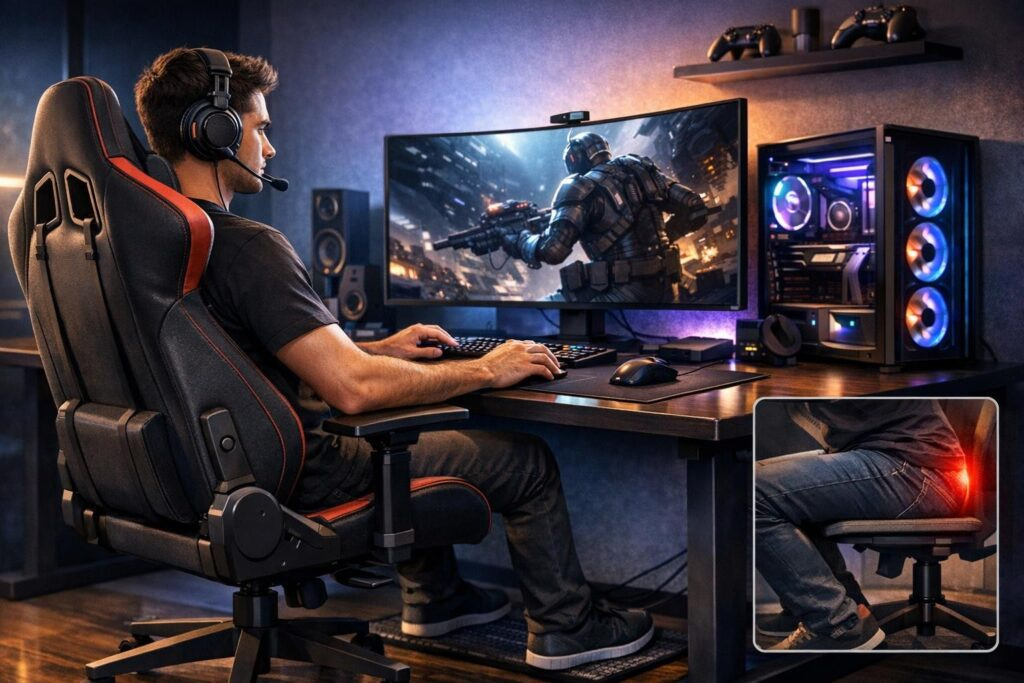
The golden standard for sitting posture is the 90-90-90 rule. This means maintaining approximately 90-degree angles at three key points:
- Knees bent at 90 degrees with feet flat on the floor
- Hips positioned at 90 degrees to your torso
- Elbows bent at 90 degrees when hands rest on your keyboard and mouse
This positioning keeps your spine in its natural S-curve, distributes your body weight evenly, and reduces strain on any single muscle group. When you follow this rule, your body can maintain proper posture for long gaming sessions without excessive fatigue.
Setting Up Your Gaming Chair Correctly
Your chair is the cornerstone of comfortable gaming setup. Even a basic adjustable chair can work wonders when configured properly. Here’s how to optimize it:
Seat Height Adjustment
Adjust your seat height so your feet rest completely flat on the floor. Your thighs should be parallel to the ground or angled slightly downward. There should be a small gap—about two to three fingers wide—between the front edge of the seat and the back of your knees. This prevents pressure on your legs and maintains healthy circulation.
Lumbar Support Positioning
The lumbar support should sit right at the curve of your lower back, typically around belt level. This maintains the natural inward curve of your spine and prevents slouching. If your chair lacks built-in lumbar support, roll up a small towel or use a cushion to fill the gap between your lower back and the chair.
Armrest Configuration
Position armrests so your elbows rest comfortably at a 90 to 100-degree angle. Your shoulders should remain relaxed and not hunched upward. The armrests support your forearms without lifting your shoulders or causing you to lean to one side. When typing or using your mouse, your forearms should be roughly parallel to the floor.
Backrest Angle
For focused gaming, a backrest angle between 100 and 110 degrees works best. This slight recline reduces pressure on your spine while keeping you alert. Save the deeper recline of 120 degrees for breaks or less intense gameplay. Always keep your back in contact with the backrest rather than perching on the edge of your seat.
Optimizing Your Desk and Peripherals
Your desk setup plays an equally important role in maintaining good posture during extended gaming sessions. Small adjustments here can make a massive difference in comfort.
Desk Height
Your desk should allow your elbows to maintain that 90-degree angle when your hands are on the keyboard and mouse. If your desk is too high, your shoulders will hunch upward. Too low, and you’ll lean forward, straining your neck and back. Most standard desks work fine when paired with a properly adjusted chair.
Keyboard and Mouse Placement
Keep your keyboard and mouse close enough that you don’t need to reach forward. Your elbows should stay close to your body, not extended outward. This reduces strain on your shoulders and wrists. Position your keyboard flat or with minimal tilt to keep your wrists in a neutral position—neither bent upward nor downward.
Keeping your peripherals within easy reach prevents the forward lean that causes most gaming-related back and neck pain.
Wrist Support Strategy
Wrist rests can be helpful, but use them correctly. They’re designed for resting between actions, not during active gameplay. Hovering your wrists slightly above the desk while gaming prevents pressure on the carpal tunnel area. During breaks, let your wrists rest on the support to relieve tension.
Footrest Benefits
If your feet don’t reach the floor comfortably even with your chair at the proper height, a footrest becomes essential. It stabilizes your lower body, maintains proper hip angle, and prevents you from sliding forward in your seat. A simple angled footrest or even a sturdy box can work perfectly.
Monitor Positioning for Neck Health
Screen placement dramatically affects neck strain during gaming. Getting this right is crucial for comfortable extended sessions.
Height and Distance
The top of your monitor should sit at or slightly below eye level. This allows you to look straight ahead or slightly downward without tilting your head. Position the screen about an arm’s length away—typically between 50 and 100 centimeters depending on screen size. You shouldn’t need to squint or lean forward to see details clearly.
Screen Angle
Center your monitor directly in front of you to avoid neck rotation. Tilt the screen slightly upward if you experience glare from overhead lighting. This positioning ensures your head stays in a neutral position with your ears aligned over your shoulders, reducing neck strain significantly.
Don’t have a monitor arm or stand? Stack some books or use a monitor riser to achieve the proper height. This simple hack costs nothing and delivers immediate ergonomic benefits.
Body Positioning Checklist
Before you dive into your next gaming session, run through this quick body positioning checklist. It takes ten seconds but prevents hours of discomfort:
| Body Part | Correct Position | Common Mistake |
|---|---|---|
| Head | Ears aligned over shoulders, chin slightly tucked | Jutting forward toward screen |
| Shoulders | Pulled back and down, relaxed | Rounded forward or hunched up |
| Back | Pressed against chair backrest, maintaining natural curve | Slouched or perched on seat edge |
| Hips | Level, positioned back in chair | Tilted or sliding forward |
| Arms | Resting lightly on armrests, elbows at 90 degrees | Reaching forward or hanging unsupported |
| Wrists | Neutral position, not bent up or down | Angled sharply while gaming |
| Legs | Feet flat, knees at 90 degrees | Crossed or dangling |
Movement Breaks and Stretching
Perfect posture alone isn’t enough. Your body needs regular movement to stay healthy during marathon gaming sessions. Implement these habits:
The 45-Minute Rule
Set a timer to remind yourself to move every 45 minutes. Stand up, walk around for a minute or two, and do some basic stretches. This breaks up static positioning and gets your blood flowing again. Even quick movements make a significant difference.
Simple Gaming Stretches
- Shoulder rolls: Roll your shoulders backward ten times, then forward ten times
- Neck stretches: Gently tilt your head to each side, holding for ten seconds
- Wrist circles: Rotate your wrists in both directions to relieve tension
- Hip hinges: Stand and gently lean forward at the hips to stretch your lower back
- Seated twists: While sitting, rotate your torso to each side to mobilize your spine
Eye Care for Gamers
Follow the 20-20-20 rule: every 20 minutes, look at something 20 feet away for 20 seconds. This reduces eye strain and gives you a natural reminder to check your posture. Your eyes need breaks just like your muscles do.
Common Posture Mistakes Gamers Make
Awareness of these common errors helps you catch and correct them before they become painful habits:
Leaning Forward During Intense Moments
When gameplay gets intense, many gamers unconsciously lean toward their screens. This puts enormous strain on your neck and upper back. Train yourself to stay planted against your backrest even during clutch moments.
Crossing Legs
Crossing your legs might feel comfortable initially, but it misaligns your hips and spine. Keep both feet planted on the floor or footrest throughout your session.
Gripping Peripherals Too Tightly
Excessive grip tension in your hands and forearms leads to fatigue and increases injury risk. Hold your mouse and controller with a relaxed grip, using only the pressure necessary for control.
Gaming in Bed or on Couches
Casual gaming positions might seem comfortable for short sessions, but they lack the support needed for extended play. Reserve proper desk gaming for your long sessions and competitive matches.
Budget-Friendly Ergonomic Improvements
You don’t need expensive gaming chairs or fancy equipment to improve your setup. These low-cost solutions deliver real results:
- Rolled towel for lumbar support instead of expensive cushions
- Stack of books to raise monitor height
- Cardboard box as a makeshift footrest
- Phone timer apps for movement reminders
- Desk lamp to reduce screen glare and eye strain
The key isn’t spending money—it’s understanding ergonomic principles and applying them creatively with what you have available.
Long-Term Benefits of Good Gaming Posture
Investing time in proper posture setup pays dividends beyond just comfort. Better positioning improves your gaming performance by reducing fatigue and maintaining focus during extended sessions. You’ll notice faster reaction times when your body isn’t fighting against poor positioning.
Long-term health benefits include reduced risk of chronic back pain, fewer headaches, better circulation, and decreased likelihood of repetitive strain injuries. Your body will thank you years down the road when you’ve avoided the cumulative damage that affects many longtime gamers.
Professional esports players treat ergonomics seriously because they understand that physical health directly impacts performance. If you’re serious about gaming, your posture deserves the same attention you give to your hardware and internet connection.
Final Thoughts on Gaming Comfort
The best posture for long gaming sessions comes down to consistent application of simple principles. Follow the 90-90-90 rule, keep your spine supported, position your monitor correctly, and take regular movement breaks. These habits transform marathon sessions from painful endurance tests into comfortable experiences.
Start with one or two adjustments today rather than trying to perfect everything at once. Notice which changes make the biggest difference for your comfort, then build from there. Your setup will evolve as you discover what works best for your body and gaming style.
Remember that even perfect ergonomics can’t replace the need for movement. Stand up regularly, stretch between matches, and listen to your body when it signals discomfort. With these gaming posture tips implemented, you’ll game better, longer, and healthier.
Frequently Asked Questions
What is the best sitting position for gaming?
The ideal gaming position follows the 90-90-90 rule with your knees, hips, and elbows all bent at approximately 90 degrees. Keep your back pressed against the chair backrest with proper lumbar support, feet flat on the floor, and shoulders relaxed. Your monitor should be at eye level about an arm’s length away. This positioning minimizes strain on your spine, neck, and joints during extended gaming sessions.
How often should I take breaks during long gaming sessions?
Take a movement break every 45 to 60 minutes during extended gaming. Stand up, walk around for a minute or two, and perform simple stretches targeting your neck, shoulders, back, and wrists. Additionally, follow the 20-20-20 rule for your eyes: every 20 minutes, look at something 20 feet away for 20 seconds. These regular breaks prevent stiffness, maintain circulation, and reduce fatigue.
Do I really need an expensive gaming chair for good posture?
No, you don’t need an expensive gaming chair to maintain good posture. Any adjustable chair with proper height adjustment and backrest support can work effectively. Focus on the ergonomic principles rather than the price tag. You can add DIY lumbar support using a rolled towel, adjust seat height correctly, and ensure your feet reach the floor. Proper setup and positioning matter more than expensive equipment.
Why does my neck hurt after gaming sessions?
Neck pain during or after gaming typically results from your monitor being positioned too low or too far away, causing you to tilt your head forward or downward. This forward head posture strains your neck muscles. To fix this, raise your monitor so the top sits at or slightly below eye level, position it about an arm’s length away, and ensure your head stays aligned with ears over shoulders rather than jutting forward.
What’s the best way to prevent wrist pain from gaming?
Prevent wrist pain by keeping your wrists in a neutral position—not bent upward or downward—while gaming. Position your keyboard flat or with minimal tilt, keep your mouse at the same height as your keyboard, and avoid resting your wrists on hard surfaces during active gameplay. Use wrist rests only during breaks, not while actively playing. Take regular breaks to perform wrist stretches and circles to maintain flexibility and reduce tension.
Can good posture actually improve my gaming performance?
Yes, proper gaming posture directly impacts performance. When your body is correctly aligned and supported, you experience less fatigue, maintain better focus, and react faster during gameplay. Poor posture causes muscle tension and discomfort that distract you from the game and slow your reaction times. Many professional esports players prioritize ergonomics because they understand that physical comfort translates to competitive advantage during extended practice and tournament sessions.
Comments (0)
Sign In / Sign Up
Sign in with your Google account to leave a comment. It's fast, easy, and secure.
No comments yet
Be the first one to share your thoughts!