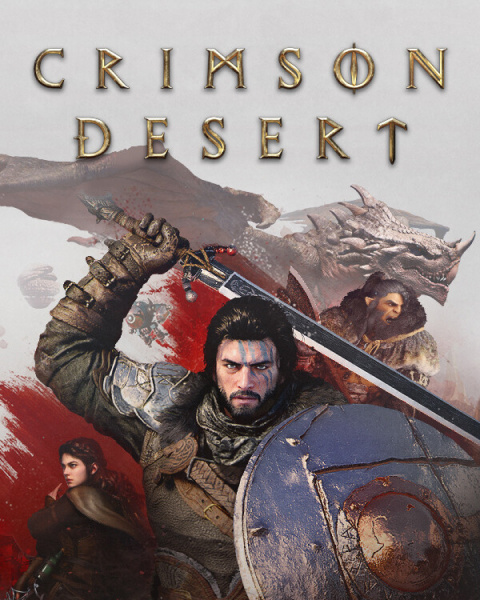
Crimson Desert is a massive-scale action RPG from Pearl Abyss, the developers of Black Desert Online. The game features outstanding graphics, a vast open world, and cinematic-quality production values. That’s why Crimson Desert’s system requirements are significantly higher than those of most modern games. In this guide, you’ll find comprehensive information on the requirements for PC (Windows and Mac), PlayStation 5, Xbox Series X|S, and ROG Xbox Ally.
Crimson Desert System Requirements for PC (Windows)
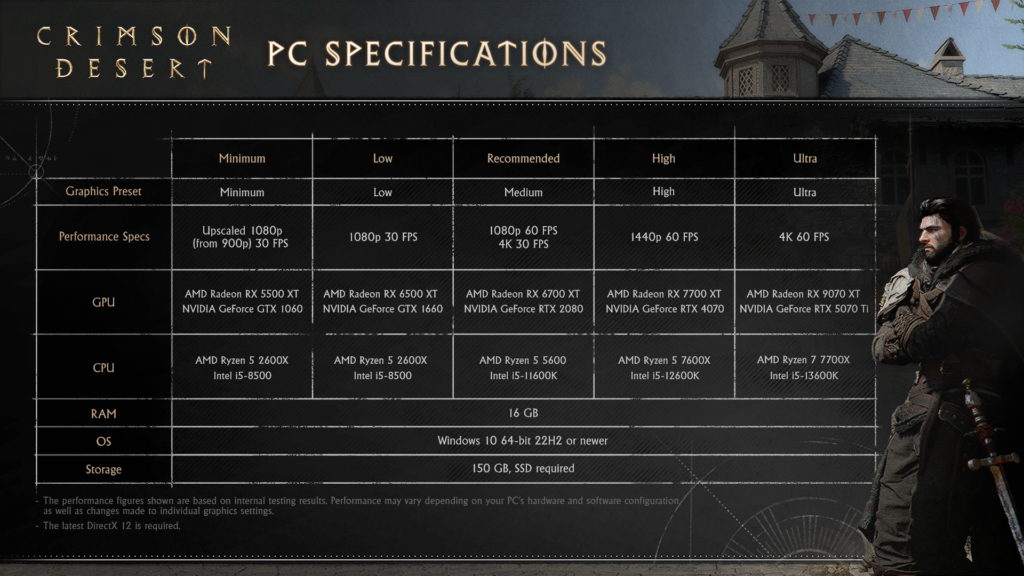
Crimson Desert supports five levels of graphics presets—from Minimal to Ultra. Each preset is designed for a specific target resolution and frame rate.
⚙️ DirectX 12 and Windows 10 64-bit version 22H2 or later are required to run the game.
Crimson Desert System Requirements (Windows)
Specifications
Minimum
Low
Recommended
High
Ultra
Graphics preset
Minimum
Low
Medium
High
Ultra
Performance
Upscaled 1080p (from 900p), 30 FPS
1080p, 30 FPS
1080p 60 FPS / 4K 30 FPS
1440p, 60 FPS
4K, 60 FPS
GPU (AMD)
Radeon RX 5500 XT
Radeon RX 6500 XT
Radeon RX 6700 XT
Radeon RX 7700 XT
Radeon RX 9070 XT
GPU (NVIDIA)
GeForce GTX 1060
GeForce GTX 1660
GeForce RTX 2080
GeForce RTX 4070
GeForce RTX 5070 Ti
CPU (AMD)
Ryzen 5 2600X
Ryzen 5 2600X
Ryzen 5 5600
Ryzen 5 7600X
Ryzen 7 7700X
CPU (Intel)
Core i5-8500
Core i5-8500
Core i5-11600K
Core i5-12600K
Core i5-13600K
RAM
16 GB
16 GB
16 GB
16 GB
16 GB
OS
Windows 10 64-bit 22H2
Windows 10 64-bit 22H2
Windows 10 64-bit 22H2
Windows 10 64-bit 22H2
Windows 10 64-bit 22H2
Storage
150 GB, SSD
150 GB, SSD
150 GB, SSD
150 GB, SSD
150 GB, SSD
What You Need to Know About PC Requirements
RAM: The unified threshold for all presets is 16 GB. Although there is no separation by preset, it is recommended to use DDR4/DDR5 dual-channel mode for maximum performance.
Storage: The game takes up 150 GB and requires an SSD. Installation on an HDD is not supported and may result in critical loading issues.
GPU: To play in 4K at 60 FPS, you’ll need a latest-generation graphics card: NVIDIA RTX 5070 Ti or AMD RX 9070 XT.
Upscaling: At minimum settings, the game upscales from 900p to 1080p, allowing it to run on GTX 1060-class graphics cards.
Crimson Desert Console Specifications
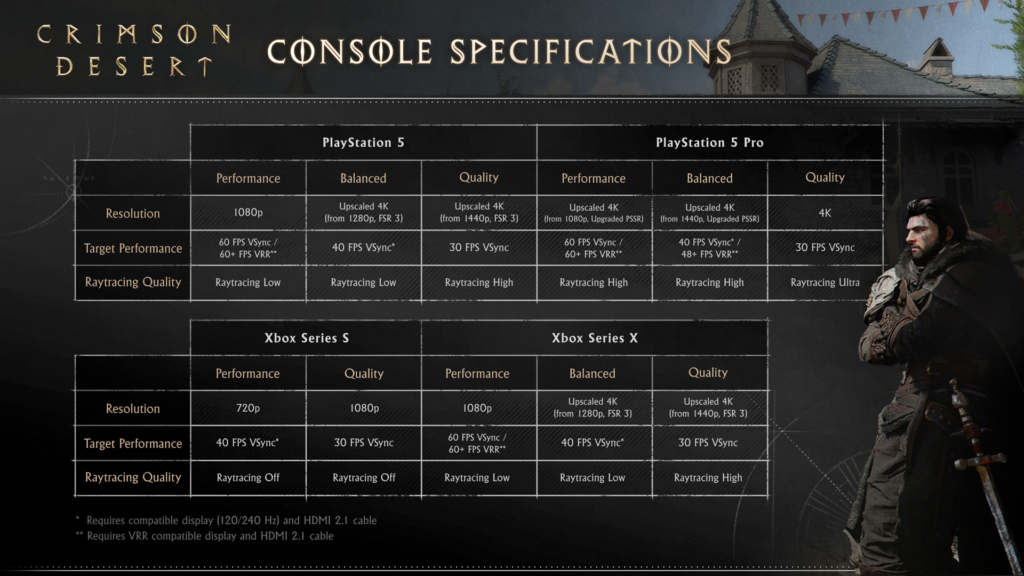
Crimson Desert is coming to PlayStation 5, PlayStation 5 Pro, Xbox Series X, and Xbox Series S. Each platform offers several display modes that differ in resolution, frame rate, and ray tracing quality.
PlayStation 5 and PlayStation 5 Pro
Parameter
PS5 — Performance
PS5 — Balanced
PS5 — Quality
PS5 Pro — Performance
PS5 Pro — Balanced
PS5 Pro — Quality
Resolution
1080p
Upscaled 4K (from 1280p, FSR 3)
Upscaled 4K (from 1440p, FSR 3)
Upscaled 4K (from 1080p, PSSR)
Upscaled 4K (from 1440p, PSSR)
4K
Target FPS
60 FPS VSync / 60+ FPS VRR**
40 FPS VSync*
30 FPS VSync
60 FPS VSync / 60+ FPS VRR**
40 FPS VSync* / 48+ FPS VRR**
30 FPS VSync
Ray Tracing
Raytracing Low
Raytracing Low
Raytracing High
Raytracing High
Raytracing High
Ray Tracing Ultra
* Requires a compatible display (120/240 Hz) and an HDMI 2.1 cable** Requires a display with VRR support and an HDMI 2.1 cable
The PS5 Pro offers native 4K in Quality mode with Ultra Ray Tracing—a level of performance not available on the standard PS5. PSSR (PlayStation Spectral Super Resolution) technology provides higher-quality upscaling compared to FSR 3.
Xbox Series X и Xbox Series S
Parameter
Series S — Performance
Series S — Quality
Series X — Performance
Series X — Balanced
Series X — Quality
Resolution
720p
1080p
1080p
Upscaled 4K (from 1280p, FSR 3)
Upscaled 4K (from 1440p, FSR 3)
Target FPS
40 FPS VSync*
30 FPS VSync
60 FPS VSync / 60+ FPS VRR**
40 FPS VSync*
30 FPS VSync
Ray Tracing
Raytracing Off
Raytracing Off
Raytracing Low
Raytracing Low
Raytracing High
The Xbox Series S is the least powerful of the supported consoles. Ray tracing is completely disabled on it, and the maximum resolution is 1080p. The Xbox Series X delivers upscaled 4K with ray tracing in Quality mode.
ROG Xbox Ally and Ally X: Crimson Desert Specifications
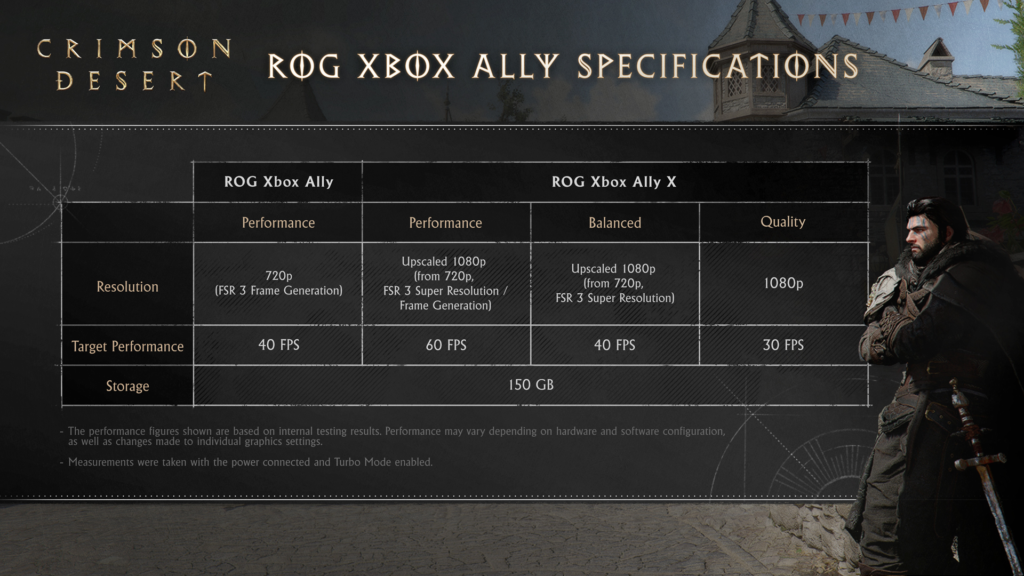
Crimson Desert is officially optimized for the ROG Xbox Ally and ROG Xbox Ally X handheld consoles. This makes the game one of the few AAA titles with official support for Windows-based handheld platforms.
Specifications table for the ROG Xbox Ally
Параметр
ROG Xbox Ally — Performance
ROG Xbox Ally X — Performance
ROG Xbox Ally X — Balanced
ROG Xbox Ally X — Quality
Разрешение
720p (FSR 3 Frame Generation)
Upscaled 1080p (от 720p, FSR 3 SR + FG)
Upscaled 1080p (от 720p, FSR 3 SR)
1080p
Целевой FPS
40 FPS
60 FPS
40 FPS
30 FPS
Накопитель
150 ГБ
150 ГБ
150 ГБ
150 ГБ
Performance figures are based on the developer’s internal tests. Measurements were taken with the device plugged in and Turbo Mode enabled.
Thanks to its more powerful chip, the ROG Xbox Ally X is capable of delivering 60 FPS in Performance mode via FSR 3 Frame Generation, which is an excellent result for a portable device. The base version of the ROG Xbox Ally is limited to 40 FPS.
Crimson Desert System Requirements for Mac
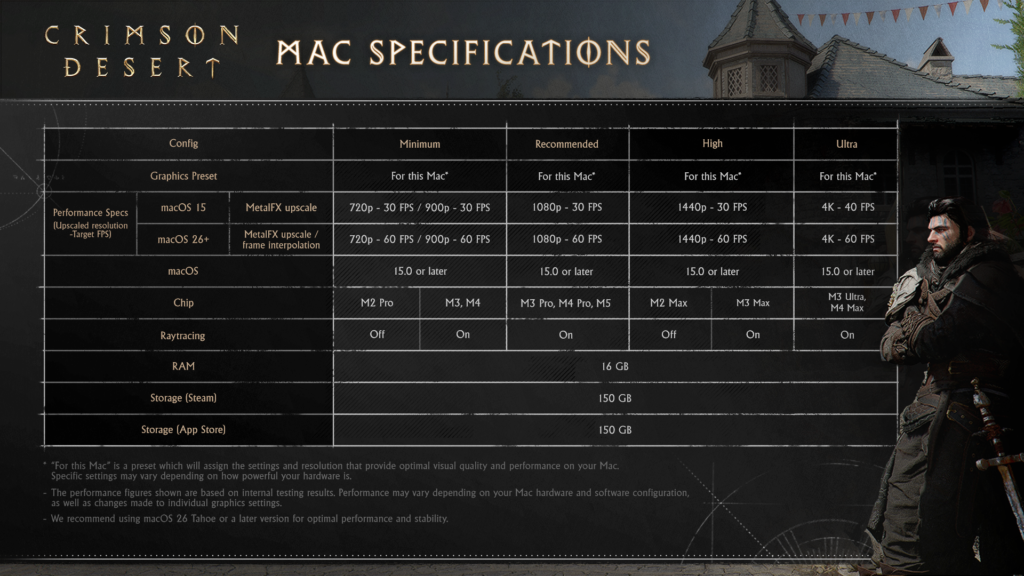
Crimson Desert is one of the few large-scale action RPGs to receive native macOS support. The game is available both on Steam and the Mac App Store. Both versions require 150 GB of free disk space.
📌 The developers strongly recommend using macOS 26 “Tahoe” or later for maximum performance and stability.
System Requirements Table for Mac
Parameter
Minimum
Recommended
High
Ultra
Graphics preset
For this Mac*
For this Mac*
For this Mac*
For this Mac*
macOS 15 (MetalFX upscale)
720p–30 FPS / 900p–30 FPS
1080p–30 FPS
1440p–30 FPS
4K–40 FPS
macOS 26+ (MetalFX upscale + frame interpolation)
720p–60 FPS / 900p–60 FPS
1080p–60 FPS
1440p–60 FPS
4K–60 FPS
Minimum macOS version
15.0
15.0
15.0
15.0
Chip (minimum)
M2 Pro
M3 / M4
M3 Pro / M4 Pro / M5
—
Chip (with ray tracing)
M3, M4
M3 / M4
M2 Max
M3 Max / M3 Ultra / M4 Max
Ray tracing
Off / On
On
Off / On
On
RAM
16 GB
16 GB
16 GB
16 GB
Storage (Steam)
150 GB
150 GB
150 GB
150 GB
Storage (App Store)
150 GB
150 GB
150 GB
150 GB
* “For this Mac” is a preset that automatically determines the optimal resolution and graphics settings for your specific Mac model.
Key Features of the Mac Version
MetalFX Upscaling is available on all supported chips (starting with the M2 Pro).
Frame Interpolation is available only on macOS 26 and allows you to double the target FPS: from 30 to 60.
The M2 Pro chip is the minimum requirement to run the game without ray tracing. To enable RT, you need at least an M3 or M4.
Ultra mode at 4K and 60 FPS requires an M3 Ultra, M4 Max, or M3 Max with macOS 26.
The M5 is mentioned in the High preset specifications, indicating support for the latest Apple chips.
Tips for Optimizing Crimson Desert
For PC
Enable upscaling—if your graphics card can’t handle native 4K, use FSR or DLSS. On minimum settings, the game already uses upscaling from 900p.
An SSD is required — do not attempt to install the game on an HDD. This is an official requirement from the developer.
Check your Windows version — Windows 10 22H2 or Windows 11 is required. Earlier versions are not supported.
Update DirectX 12 — make sure you have the latest version installed via Windows Update.
For consoles
On the PS5 Pro, use Quality Mode—Ultra Ray Tracing and native 4K are only available here.
VRR significantly improves the experience—if you have a compatible display with HDMI 2.1, enable VRR for smooth gameplay in Performance mode.
40 FPS mode on a 120 Hz display—the optimal balance between image quality and smoothness.
For Mac
Upgrade to macOS 26—that’s the only way to get Frame Interpolation and double the FPS.
Use the “For this Mac” preset — it automatically selects settings tailored to your hardware.
Plug in your Mac—performance decreases when running on battery power.
Frequently Asked Questions
Can I run Crimson Desert without an SSD? No. An SSD is an official requirement for all platforms, including PC and Mac. HDDs are not supported.
How much space does Crimson Desert take up? The game takes up 150 GB on all platforms—PC, Mac (Steam and App Store), consoles, and ROG Xbox Ally.
Does Crimson Desert support ray tracing on the Xbox Series S? No. On the Xbox Series S, ray tracing is completely disabled in both available modes (Performance and Quality).
What is the minimum Mac chip required for Crimson Desert? The minimum is an Apple M2 Pro (without ray tracing). For RT, you need at least an M3 or M4.
Does Crimson Desert work on Windows 10? Yes, but only on version 22H2 or later. Earlier builds of Windows 10 are not supported.
Is there a difference between the Steam and App Store versions for Mac? There is no difference in system requirements—both versions take up 150 GB and require macOS 15.0 or later.
Results
Crimson Desert is a technically demanding game that makes full use of modern hardware capabilities. Nevertheless, the developers have strived to ensure broad compatibility: from GTX 1060-level graphics cards to the RTX 5070 Ti, from the Xbox Series S to the PS5 Pro, and even a native client for Mac on Apple Silicon.
Platform
Minimum
For 60 FPS
PC Windows
GTX 1060 / Ryzen 5 2600X
RTX 2080 / Ryzen 5 5600 (1080p)
PS5
—
Performance mode (60 FPS VRR)
PS5 Pro
—
Performance или Balanced (60 FPS)
Xbox Series X
—
Performance mode (60 FPS VRR)
Xbox Series S
—
Performance mode (40 FPS)
ROG Xbox Ally X
—
Performance mode (60 FPS, FSR 3 FG)
Mac
M2 Pro (macOS 15)
M3/M4 + macOS 26 (1080p 60 FPS)
If you plan to play on a PC, make sure your system meets at least the recommended requirements for a smooth experience. Console owners should look for a display that supports 120 Hz and HDMI 2.1—this significantly expands the capabilities of performance modes.
All performance metrics are based on internal testing by Pearl Abyss. Actual results may vary depending on specific hardware and software configurations.
Published
Modified
ZEPHICK
Rimus Mirotvoretz
Game Guides Author
An old-school gamer who started playing at around age three, when the keyboard was almost bigger than he was. Long before gaming became mainstream, he was already exploring virtual worlds, breaking game mechanics, and searching for the fastest ways to beat levels.

































Comments (0)
Sign In / Sign Up
Sign in to leave a comment.
No comments yet
Be the first one to share your thoughts!